Related Guidance
As you meet the below reimbursement-specific requirements, please also ensure that you also refer back to our high-level expense checklist. We also have separate guidance on invoice expenses.
The guidance on this page extends from and expands upon our core Accountable Reimbursement Plan.1
Submitting for reimbursement
The below guidance is for when you - a volunteer or member of a fiscally-sponsored project of Raft Foundation - wish to submit receipts for reimbursement.
We use Open Collective as our expense management platform - the same platform that Raft projects use to raise and manage money.
To submit an expense, go to the project’s profile2 on Open Collective, click “Submit expense,” and select “Receipt.” The system will guide you through the process of uploading receipts and adding information about them.
Once you submit, your expense request will be reviewed by a member of the project,3 and then reviewed and (if all below requirements and those of the Expense Checklist are met) paid by the Raft Foundation administrative team.
Info
International recipient? Using a non-US bank account? See International expenses.
Warning
Contractors should refer back to their contract to understand whether or not their related expenses are eligible for reimbursement.
Requirements
Raft’s reimbursement-specific requirements include, for receipts:
- The receipt must be legible4, showing the name of the vendor, date the transaction took place, and the total amount paid
- The receipt must be itemized (see Itemized receipts)
- The receipt must be from within the last 60 days (at time of submission)
- Where possible, the receipt should show the form of payment used.5
And for the Open Collective expense submission:
- In the submission, each receipt must have a description of what was purchased (i.e., not just the name of the store)
- Tn the submission, the date field for each receipt should match the purchase date
- In each expense submission, all receipts must belong to a single accounting category - read the extensive explanation below
Itemized receipts
An itemized receipt is a detailed document that lists each item purchased along with its price, any applicable taxes, and the total amount paid.
Receipts that show only a total, such as credit card authorization receipts or invoices still showing an unpaid balance, may not be sufficient as documentation, and on a case-by-case basis, may not be eligible for reimbursement.
Mileage reimbursement
We have a special process for mileage reimbursement that is quite different from the above. See Driving for more information.
Excess reimbursement
In the rare case that excess reimbursement is given, or if a past reimbursement is determined to have been incorrect or improper, excess funds must be returned within 120 days of receipt of the funds.
Alternatives to the reimbursement approach
Projects also have the opportunity to request an expense card. See Expense cards.
Submitting multiple receipts in a single expense
If you wish to submit multiple receipts, you can do so by clicking “Add New Receipt” - but please read below our approach to multi-receipt expenses.
A major part of our accounting and bookkeeping processes is categorizing expenses. These are different from the tags you can add on Open Collective, and come straight from standard accounting practice. They help us ensure that our audits and tax filings - an under-the-radar but essential part of fiscal sponsorship work - go smoothly.
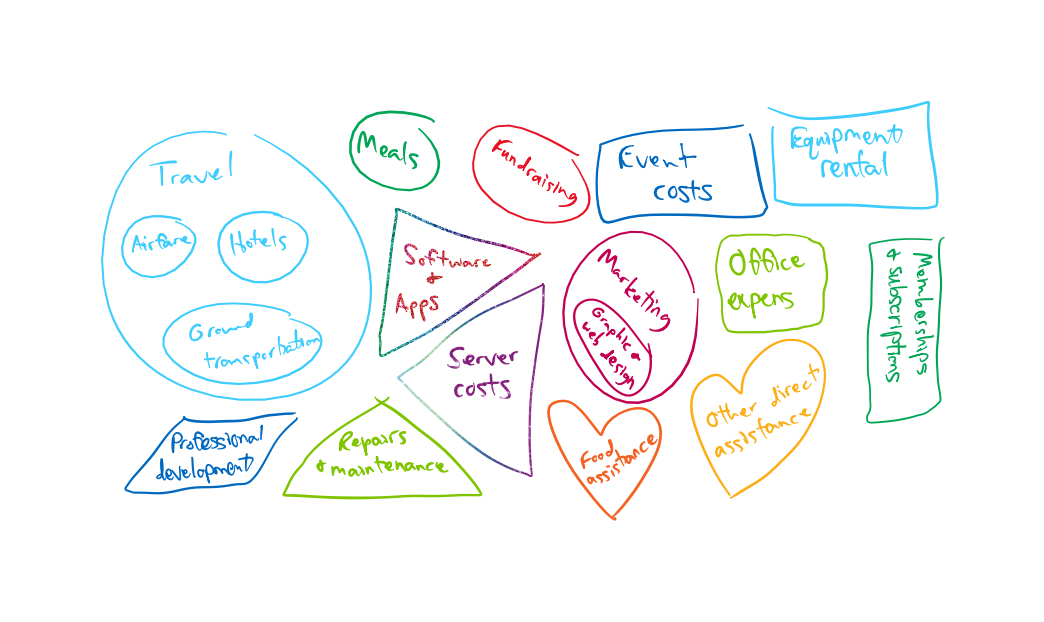
Currently, we can only categorize on a per-expense basis. So, while Open Collective allows you to add multiple receipts to a single expense submission, please only submit multiple receipts in the same expense if they can fit within the same expense category, of those shown below.
If your receipts do not fit into a single category, please submit multiple expenses.
If your receipt doesn’t seem to fit any of the categories, send us an email and we will figure it out.
Info
Below, note that some of the categories have parent categories. As long as it fits within either a parent or child category, we can process the expense.
For example, if you include both an airfare and hotel/accommodation receipt in the same expense, we can process it as Travel. But if you include food, we will need you to split it into two expense requests.
Alphabetical list of categories
With some additional notes in brackets.
Airfare [child of Travel]
Equipment rental
Event costs [can include many types of event-related expenses]
Food assistance [i.e., food mutual aid]
Fundraising
Graphic and web design [child of Marketing]
Ground transportation [child of Travel]
Hotels [child of Travel; includes other forms of accommodation]
Marketing [parent of Graphic and web design]
Meals
Memberships & subscriptions [to things other than software/servers, and that do not fall under professional development]
Office expenses
Other direct assistance [i.e., non-food mutual aid]
Professional development
Repairs & maintenance
Server expenses
Software & apps
Travel [parent of several others]
Visualization of expense categories
Here’s a drawing visualizing our expense categories for the visually-inclined.
Multiple photos or pdfs for the same receipt
If you have multiple photos or documents for a single reimbursement6:
- Try taking a photo with both pages or receipts in-frame
- Use MergeJPG or something similar to combine two images into one
- Use CombinePDF or a similar tool to turn multiple pdf files into one
Footnotes
-
Our core financial policies are only visible to Raft members, if you are not logged in you will not be able to see the linked page. ↩
-
If you do not have the link to the profile for the project you want to support, feel free to review the list of projects on our profile, or contact us and we will be happy to help. ↩
-
To avoid disappointment, we advise that volunteers get clear approval from a project member before spending funds. ↩
-
Receipt ink fades quickly! Make sure to take a photo soon after the purchase. The greater the expense, the less likely we will be to “take your word for it.” ↩
-
I.e., cash, check, or the last four digits of your card. If the receipt does not show the form of payment used, or even that payment went through, please include with the itemized receipt a credit card authorization or other form of documentation showing payment - here are some ways to combine them into a single image file, or you may also include them in an expense comment. ↩
-
For example, when you have an itemized receipt showing the total for a diner, but then also need to show the tip, which only shows on the credit card authorization. Or if the itemized receipt does not show tax or other fees. ↩