Expenses are only paid when:
- They are submitted on Open Collective…
- To a project balance with sufficient funds…
- Following the specific guidance for the particular type of expense (i.e., invoice, reimbursement, grant request, or mileage) and with the proper documentation described there (i.e., invoice to Raft, completed tax form, itemized receipt)…
- Approved by a Project Lead (other than the submitter, unless there is only one) and clearly in support of the project’s charitable purposes…
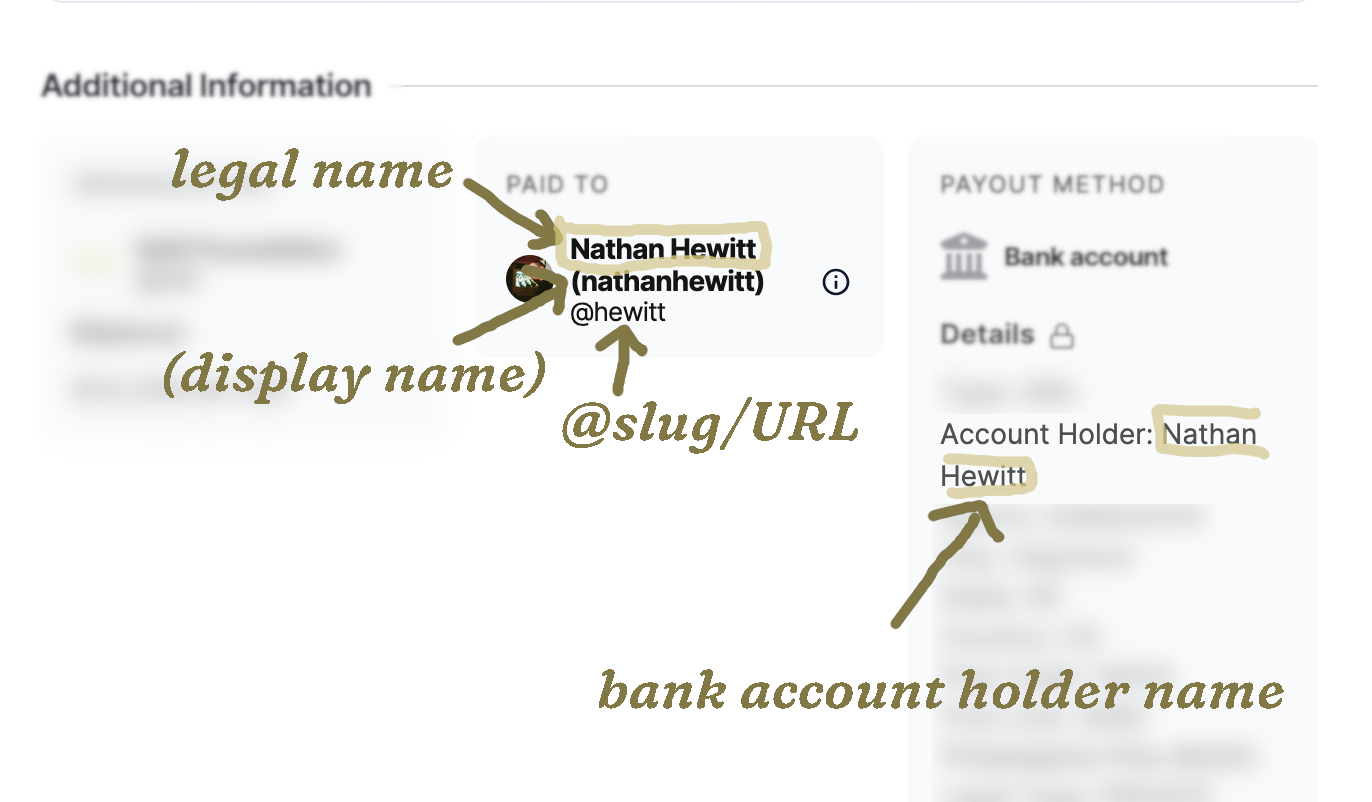
- And matching legal names for the recipient and bank account holder
Read below for additional details on these requirements.
Unpayable expenses
Naturally, there are also exceptions - expenses that we can never pay due to government regulations and our own operational limitations. See Unpayable expenses for a list of those we currently know.
1. Submitting on Open Collective
Start by reading Open Collective’s guidance here.
Creating an Open Collective account
You will need to create an account in order to proceed!
Creating an organization account
If an organizational (i.e. a business) bank account will be receiving the money, you will also need to create an organization account.
Submitting the appropriate tax forms
If invoiced expenses have exceeded $2,000 USD for the year, you will be prompted to fill out a tax form via the Open Collective platform. You are also welcome to submit your required tax forms via email.
Expense descriptions
As required by law, we are audited by an independent Certified Public Accountant once per year. They choose a somewhat-random sampling of transactions and ask us to provide documentation on the purpose of these transactions.
As a result, the description added on Open Collective for each transaction should be descriptive enough such that an outside observer would understand it to be clearly for a charitable purpose, and the project’s purposes in particular - especially if this is not clear from the receipt or invoice documentation.
A note on addresses
Our payment processor, Wise, does not allow the address associated with your bank account to be a P.O. Box. It must be a proper residential address.
Non-OC expenses
If an expense cannot be paid on Open Collective, for example if:
- You are working with a large, corporate, and/or university vendor that is asking/insisting that you to set things up in their system
- Because of bureaucracy and/or the power dynamic with the payee, you would rather us just send them the funds, and not ask them to set up an Open Collective account
…or for some other reason, please contact us.
2. Project balances
As soon as the project has sufficient funds, a submitted and approved expense will become available for payment by our admin team. A project’s balance can be viewed on their Open Collective profile.1 Wondering why an expense has not been paid? Reach out to us and we will be happy to help.
3. Specific guidance by expense type
Make sure to follow the specific guidance for the particular type of expense
- Invoices
- Reimbursements
- Grant requests (coming soon)
- Mileage reimbursements
4. Expense approvals
All expenses should be, in the words of the IRS, “ordinary” and “necessary”:
- Ordinary: be common, reasonable, and accepted in the nonprofit industry
- Necessary: be helpful toward a Raft project and appropriate for accomplishing our overall mission
Now, at Raft we think your work is extraordinary - but what they are really saying, here, it should be clear to a neutral outside observer that the expense supports the furtherance of the project’s mission.
As long as that is the case, and the project leaders expected you to submit the expense, approval should be no problem. :)
Discussion in the expense comments
If we have questions or concerns about an expense, we will often use Open Collective’s expense comments - which send you an email notification - to discuss further and iron everything out.
Approving your own expenses
We generally only allow project leads to approve their own expenses when they are the sole leader of a project. We recommend that projects with more than one project lead turn on the related setting in Open Collective, found in Dashboard → Settings → Policies:

5. Matching legal names
To avoid fraud, we check to make sure that the legal name of the person or entity shown as the payee in Open Collective matches the bank account holder name:
How to update your legal name
To edit your “legal name” for your Open Collective account. Please do the following:
- Make sure you are logged in to Open Collective.
- On desktop or mobile, click on the profile image circle in the upper right hand corner of the screen, then select “Settings.”
- Edit your “Legal Name” to match the one on your bank account.
- You may make your “Display Name” whatever you want, or make it something pseudonymous like “incognito” or “John Dough” (see also: Transparency and anonymity)
- Click “Save” at the bottom!
How to edit the name you entered for the bank account
To edit the bank account name, go back and edit the expense, and either edit the current payment method or submit a new one.
Footnotes
-
If you do not have the link to the profile for the project you want to support, feel free to review the list of projects on our profile, or contact us and we will be happy to help. ↩